


Live Weather Radar Launcher
4.26.00K Reviews
App Specs
- Version
- 3.15.0
- Updated On
- License
- Free
- Downloads
- 1,000,000+
- Developer
- AtomApplications
- Categories
- Weather
- Platform
- Android
Screenshots
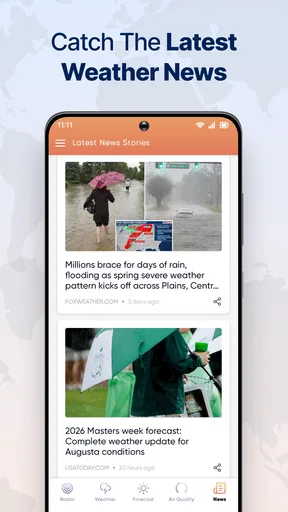
 Analysis by AppCompare
The most useful idea behind Live Weather Radar Launcher is putting weather maps close to the place where you start using your phone: the home screen. That changes the experience from opening a forecast only when you remember to check it into making weather a more visible part of the day. I find that approach practical when the question is immediate—whether to leave now, take a jacket, or wait out a shower—rather than when I want a deep meteorological report.
Weather at a glance, with a map when details matter
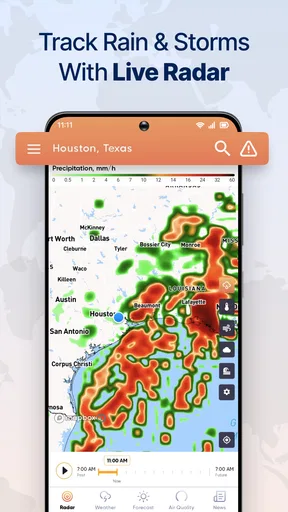
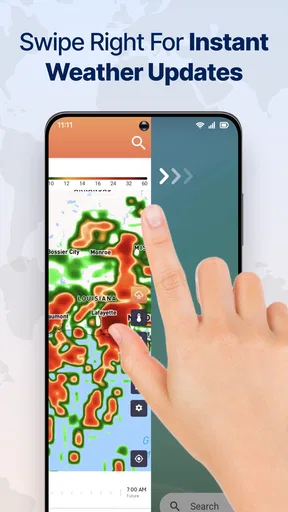
Many standard weather apps lead with a forecast card and keep radar a tap or two away. This app’s emphasis is different: it combines local conditions and forecast information with radar and map views, while also functioning as a launcher. A map can be more revealing than a single rain icon because it gives context around your location. You can look at the broader pattern and decide whether a patch of weather seems relevant to your route or just nearby.
That does not make a radar view a guarantee of what will happen at your front door. I treat it as a planning aid, not a promise: it helps me notice changing conditions, while the local forecast gives me another way to judge the day. For decisions that matter—like changing a long drive or an outdoor plan—I would check the app again shortly before leaving instead of relying on a glance hours earlier.
A practical routine for everyday plans
Imagine getting ready for work while rain is possible. Rather than opening a separate weather app, searching for your town, then returning to the home screen, you can make the weather-led setup part of your normal phone routine. Check the local conditions first, then use the map if the forecast leaves you unsure whether a shower is likely to affect your commute. That quick sequence is the capability’s real strength: it can make a useful check feel less like a separate task.
For errands, school pickup, or a walk, I would use the same habit. A glance can help you decide whether to bring an umbrella or shift the timing, while a closer look at the radar can add useful context. It is especially handy when the weather is changeable and a broad “rain later” forecast is not enough to answer the question you actually have: should I go now?
Where the launcher format helps—and where it may not
The trade-off is that a launcher is more involved than a small, standalone forecast app. It affects the feel and organization of the home screen, so it makes the most sense if you are open to changing that part of your phone. If you already like your current launcher and only want a quick glance at tomorrow’s forecast, a conventional weather app or a simple weather widget may be the less disruptive choice.
I would also keep the role of maps in perspective. They can help with situational awareness, but they do not remove uncertainty from local weather, and a colorful display is not automatically more useful than a clear forecast. If you mainly need a dependable summary of temperatures and upcoming days, a simpler app may be easier to scan. If you like seeing conditions spatially and want that information near your everyday phone use, the combined approach has a clearer payoff.
Worth Reading Before You Choose

EA SPORTS FC Mobile 26 Is a Bigger Football Game, but It Takes Time

Flipboard Shows What News Apps Must Do Beyond the Feed

Switching to Android Auto Means Rethinking Your Driving Routine

Google Calendar Makes a Crowded Week Easier to Manage

Ludo King Makes the Most of the Minutes Between Plans

Baby Panda World Brings Quick Play to Modern Phones, but Its Game Library Feels Busy
All-in-One Weather and Customization
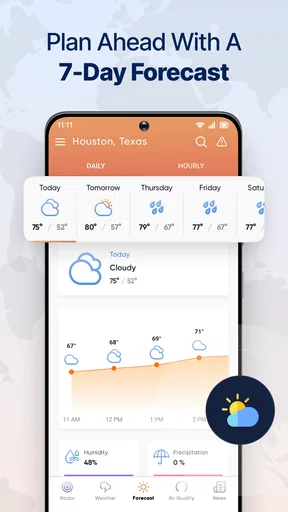
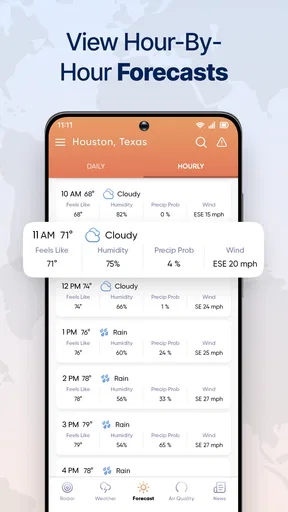
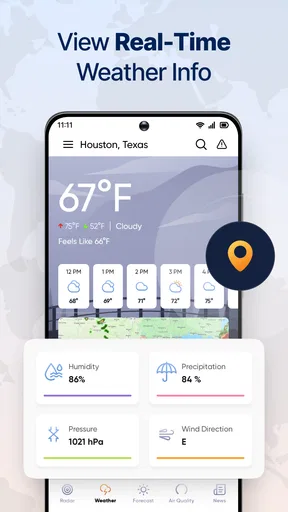
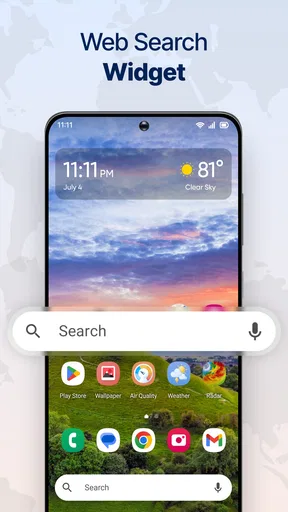
The first thing that caught my eye with Live Weather Radar Launcher is its dual functionality. You’re not just getting a run-of-the-mill weather app; it’s a full-fledged launcher that transforms your home screen into a weather hub. Right off the bat, you get real-time updates about the weather conditions in your area. And the best part? It’s all displayed with stunning live wallpapers that change according to the weather.
This app doesn’t just stop at basic weather predictions. It offers detailed weather maps and radar views, which are invaluable if you’re planning a road trip or just need to know if you should carry an umbrella. The radar feature is surprisingly detailed, showing you precipitation, wind patterns, and even temperature changes. It’s like having a mini meteorologist right in your pocket.
Customization Galore
Now, let’s talk customization. If you’re someone who loves tweaking your phone’s look, this app is your playground. The launcher provides a variety of themes and icon packs to match your style. Whether you want something minimalist or vibrant, there’s a theme for you. Plus, the ability to customize your widgets means you can have the weather information presented exactly how you like it.
The interface is smooth and user-friendly, making it easy to switch between different themes and layouts. You don’t need to be tech-savvy to make your phone look and feel fantastic. Just a few taps and you’re good to go.
Performance and Usability
Performance-wise, I was pleasantly surprised. The app runs smoothly without noticeable lag, which is crucial for any launcher. Even with the live wallpapers and constant updates, my phone’s battery life didn’t take a significant hit. The developers seem to have optimized it well for efficiency, which is something we all appreciate in a world where battery life is gold.
As for usability, the app is straightforward. The intuitive design means you won’t be left scratching your head trying to figure out how to use it. Everything is where you’d expect it to be, and the navigation feels natural.
Using it with a little judgement
I would not let a weather-themed home screen replace a basic check of the day’s forecast. The visual presentation is useful for prompting a decision, but your plans matter: a short walk near home is different from driving across town or spending hours outdoors. For a longer trip, I would look at the conditions along the route and check again before departure rather than assuming that the weather where I am now will represent the whole journey.
There is also a useful distinction between wanting information and wanting presentation. Someone who enjoys changing themes and arranging widgets may get extra value from the launcher because weather and appearance are part of the same setup. Someone who wants only a fast temperature check may find those choices beside the point. I would start by asking whether I actually want a new launcher; the radar is most compelling when the home-screen format itself appeals to me.
Who is likely to enjoy this setup?
It is a good fit for people who check conditions repeatedly during the day, prefer a map to a stack of forecast cards, and are happy to personalize their home screen. The free price makes it easy to consider, and its Everyone age rating makes it broadly suitable for general audiences. AtomApplications develops it; it has an average rating of 4.3 from around 14,000 ratings, with over 1 million installs. Those figures suggest a well-used option, though they cannot tell you whether its launcher style suits your habits.
On the other hand, I would steer someone toward a conventional forecast app if they want the smallest possible change to their phone, a plain list of upcoming conditions, or a home screen that is already carefully organized. The same goes for anyone who rarely checks weather maps: the extra visual layer is only valuable if it helps answer a real question. The best reason to choose this app is not that it does more on paper; it is that its map-centered weather check fits naturally into how you use your phone.
Getting started without overcomplicating the phone
My advice would be to keep the first setup simple. Choose a layout that leaves the information you use most easy to reach, then spend a few days noticing whether the weather display actually changes your decisions. If you often need to inspect rain movement, make that path convenient. If the main benefit is a quick local check, avoid adding visual elements that make the screen busier without making the forecast easier to understand.
This is also a sensible way to judge whether a launcher is worth keeping. A home-screen change can feel novel at first, but the useful test is whether you still find the forecast quickly after the novelty wears off. If you do, the combination of weather and customization is serving a purpose. If you keep opening another app anyway, a separate forecast tool may suit you better.
Version, cost, and the choice to try it
Live Weather is the short description used for this weather app, and version 3.9.0 is the current version. It is free, so trying the launcher does not require paying upfront. I would still think about the practical cost of switching: learning a different home-screen arrangement takes attention, even when the download itself costs nothing. Anyone using an older device should also check compatibility before installing, since the minimum operating-system requirement is Android 10.
For someone deciding between this and a usual weather app, the choice comes down to the job. A conventional app is often better for a quick, uncluttered forecast or a focused look at several upcoming days. This launcher is more appealing when you want weather maps to be part of your everyday phone environment and enjoy adjusting how that environment looks. Neither approach is automatically more accurate; the difference is how readily the information fits your routine.
Final Thoughts
In conclusion, Live Weather Radar Launcher is more than just a weather app. It’s a multifunctional tool that combines essential weather updates with the ability to personalize your phone. Whether you’re a weather geek or just someone who likes to keep things fresh, this app is worth checking out. So, why not give it a try? You might find that it’s just what you’ve been missing in your app collection.
Pros
- Real-time weather updates enhance planning.
- User-friendly interface with intuitive navigation.
- Customizable widgets for personal preferences.
- Accurate forecasts for multiple locations.
- Seamless integration with other apps.
Cons
- Ad-heavy experience can be distracting.
- Battery consumption is relatively high.
- Premium features locked behind paywall.
- Occasional lag in radar updates.
- Limited offline functionality.
FAQs for Live Weather Radar Launcher
What features does the Live Weather Radar Launcher offer?
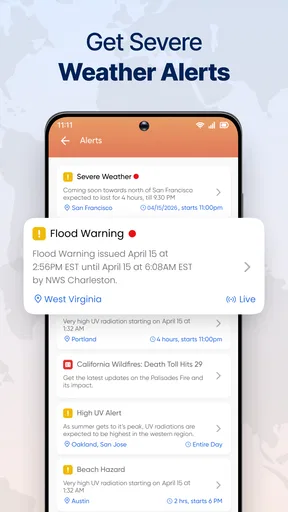
The Live Weather Radar Launcher provides real-time weather updates, interactive radar maps, and customizable widgets for your home screen. It integrates weather alerts and forecasts, allowing you to stay informed about changing conditions. The app also offers a variety of themes and layouts to personalize your experience.
Does the Live Weather Radar Launcher require a subscription?
While the Live Weather Radar Launcher is free to download and use, it offers a premium version with additional features such as ad-free usage, extended forecasts, and advanced radar options. Users can choose whether to upgrade based on their preferences and needs.
How accurate are the weather forecasts and radar in the app?
The Live Weather Radar Launcher uses data from reliable meteorological sources to provide accurate forecasts and radar imagery. While no app can guarantee 100% accuracy due to the nature of weather prediction, users generally find the app's updates to be precise and timely.
Is the Live Weather Radar Launcher compatible with all Android and iOS devices?
The app is compatible with most modern Android and iOS devices. However, it's always a good idea to check the app's requirements on the Google Play Store or Apple App Store to ensure your device meets the necessary specifications for optimal performance.
Can I customize the widgets and themes in the Live Weather Radar Launcher?
Yes, the app offers extensive customization options. Users can choose from various widget sizes, themes, and layouts to tailor their home screen's appearance. This feature allows for a personalized user experience, making it easy to access weather information that suits your style.


